|
|
|

|
|
|
Top Speed Retriever |
|
|
|
|
Introduction |
|
|
Top Speed Retriever is utility program
to allow you to analyse, query and export most of native Clarion data files
(TopSpeed *.TPS) including encrypted ones. Program supports unattended mode,
so you can use it in Scheduled tasks to automatically export data on regular
basis. Program will not do super files (rarely used TopSpeed files with multiple tables in one file). Besides it will not do Memos. So we strongly recommend you to get free trial version, take all the time you want and make sure it works for you. The only difference from the full version is that it gets every second record in TPS file. |

|
| C55 ABC Document Send Template is a potentially very useful tool for sending emails right | |
| from a Clarion application. However, we noticed a long time ago that something is horribly wrong with it. | |
| Play with the Example provided with C55, for instance. Impressively, the template allows you to send a bunch of identical emails | |
| with one click of a button. But before implementing it into your program | |
| try to send all those messages to yourself. You will discover that about half of the emails are | |
| corrupted, and instead of beautiful images some have ugly rectangles like that above. | |
| What happens is that the Document Send Template starts to insert | |
| a space character intermittently in the MIME document at the beginning of new line. This innocent | |
| character is not supposed to be there and screws up emailing completely. | |
| Below is an example of MIME document generated by C55 Document Send Template. | |
| Lines 4 and 9 (highlighted) have an extra space character in the far left position. That's it! | |
| MIME will not see the fourth line at all, so this embedded image will be treated as an | |
| attachment and recipients of this email will see nothing but empty rectangles. | |
|
------=_NextPart_1 Content-type: image/gif Content-ID: <1> Content-Disposition: inline; filename="1" Content-Transfer-Encoding: Base64 183GmgAAAAAAALAJsw0sAQAAAAA+UgEACQAAA/sCAAAGABMAAAAAAAUAAAALAgAAAAAFAAAADAKz DbAJAwAAAB4ABQAAAAkCAAAAAAQAAAACAQIABQAAAAEC/4D/AhAAAAD7Asb/AAAAAAAAvAIBAAAA AAAAAEFyaWFsAAABBAAAAC0BAAAFAAAACQIAAAAABAAAAC4BAAATAAAAMgovAbwDEAAGAPQCLwFr Bn0BU3R1ZGVudCBTY2hlZHVsZQQAAAAnAf//AwAAAB4ABQAAAAkCAAAAAAQAAAACAQIAEAAAAPsC |
|
| It appears to be the only problem this template has. Once you get rid of those | |
| spaces the problem goes away. And that's exactly what our patch does! | |
| Advantages of using template: | |
|
|
Installation |
|
| Run the installation wizard. Register new template placed by Wizard | |
| into your Clarion Template directory - mimefix.tpl. | |
| Just in case here is instruction how to do that. | |
| Open Clarion 55 (no application must be open). Go to menu item | |
| Setup -> Template Registry ->Register. Select new template | |
| mimefix.tpl and then hit Open button | |
| View animated reminder on how to do that - Registering Template | |
|
(built with our JAVA Animated
Help Builder).
|
|
Running Patch |
|
| Document Send Patch is organized as a Utility template. So to run it you have to | |
| open ANY application first (it really doesn't matter which one!). | |
| Go to menu item Application/Template Utility. Find MIMEfix - Vivid Help:: Document | |
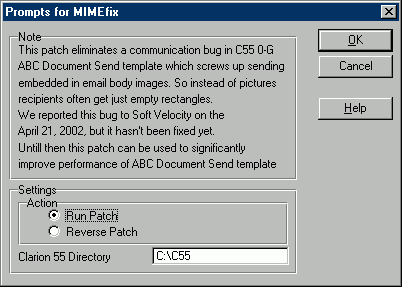
| Send Bug Killing Utility and hit Select button. It'll bring up the template window: | |
|
|
| Run utility with OK button. If you want uninstall this patch - select Reverse Patch | |
| radio button first. If you don't remember whether you've already run this utility | |
| you can run it again as many times as you want. This utility changes one file from | |
| C55/Libsrc directory so it's a good idea to backup the entire directory before running the template. | |
 Download
Installation Program (230 kb) Download
Installation Program (230 kb) |
|
|
Copyright © 2025 Vivid Help Systems Pty Ltd |
|